Run bulk email verification, detect bounced and risky emails, and continue email list cleaning without exporting files or switching tools.
Validate Emails with our Google Add-on
BounceProof works as a Google add-on, so you can verify emails right inside Google Sheets. No uploads. No switching tools. Just clean lists and fewer bounces before you hit send.



How it Works
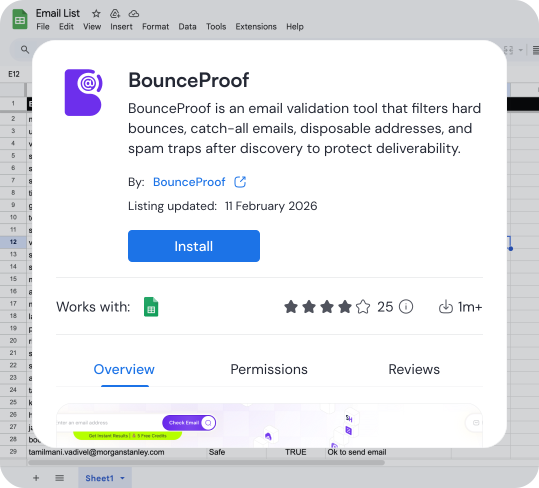

Install the BounceProof extension in Google Sheets

Select the column containing email addresses

Run validation directly from the sheet

See verification results appear in new columns
Install the BounceProof extension in Google Sheets
Select the column containing email addresses
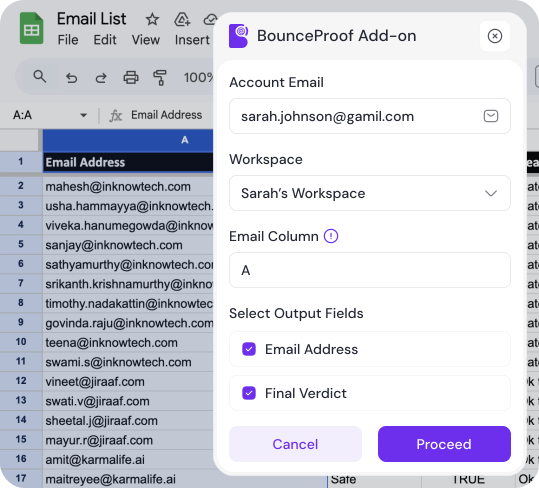
Run validation directly from the sheet
See verification results appear in new columns
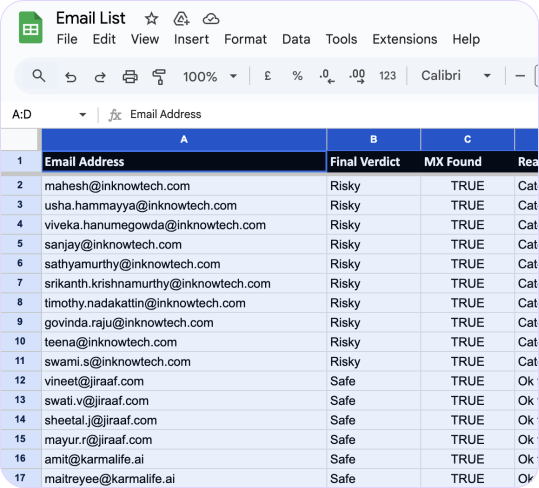
Email Verification, Directly Inside
Google Sheets
BounceProof turns Google Sheets into a practical email verification tool.

Validate email addresses at scale
Run bulk email verification on entire columns or selected rows using a lightweight bulk email checker built for spreadsheets.
Clear email status signals
Each email is classified as valid, invalid, risky, or catch-all using reliable email verifying software logic.
Email bounce risk detection
Identify bounce email and bounced email risks before campaigns go out, not after deliverability drops.
Actionable results inside Sheets
Filter, sort, and segment data in-place to maintain a clean email list without extra tools.
Actionable results inside Sheets
Filter, sort, and segment data in-place to maintain a clean email list without extra tools.

Clear, Actionable Results Added to
Your Sheet
Once validation runs, BounceProof adds structured result columns alongside your existing data, without modifying your original sheet.

Email status (Valid / Invalid / Risky / Catch-all)

Instantly filter out bounced email addresses
Email bounce indicator
Spot high-risk addresses before sending
Reason for failure or risk
Review risky emails instead of deleting blindly
Disposable or role-based email flag
Continue email list cleaning directly in Google Sheets
Why Validate Emails Directly in Google Sheets
❌Traditional way | ✅With Sheets |
|---|---|
| Export CSV files | Validate in-place |
| Reformat columns | No reformatting |
| Upload to a tool | No uploads |
| Learn a dashboard | No dashboards |
| Download results | Results inline |
✔ Check email bounce, verify addresses, and clean lists exactly where your data already lives.
Frequently Asked Questions
Yes. You can run bulk email verification on large Google Sheets using the built-in bulk email checker.
Yes. You can re-run checks anytime when rows are added or updated to check email bounce again.
BounceProof offers welcome credits so you can try the email validator before purchasing more credits.
No. Results are added in new columns next to your existing data.
Yes. Regular validation helps maintain a clean email list and prevent bounced email issues over time.
Validate Emails Where Your Data Already Lives
Use BounceProof as your Google Sheets email validator to check if an email is valid, reduce
email bounce, and maintain a clean email list, directly inside your spreadsheet.
Powered By BeFiSc
Email Lists Done Right!
© 2026 All rights reserved
All logos are the property of their respective owners


